Redeem Your Creator Code
Redeem your creator code in the app to unlock premium time for free.
Your offer
Creator codes unlock free VolumeLogic premium time. After your premium time ends, the free core app remains yours to keep.
How to redeem
- Download VolumeLogic on iOS or Android — it is free to install.
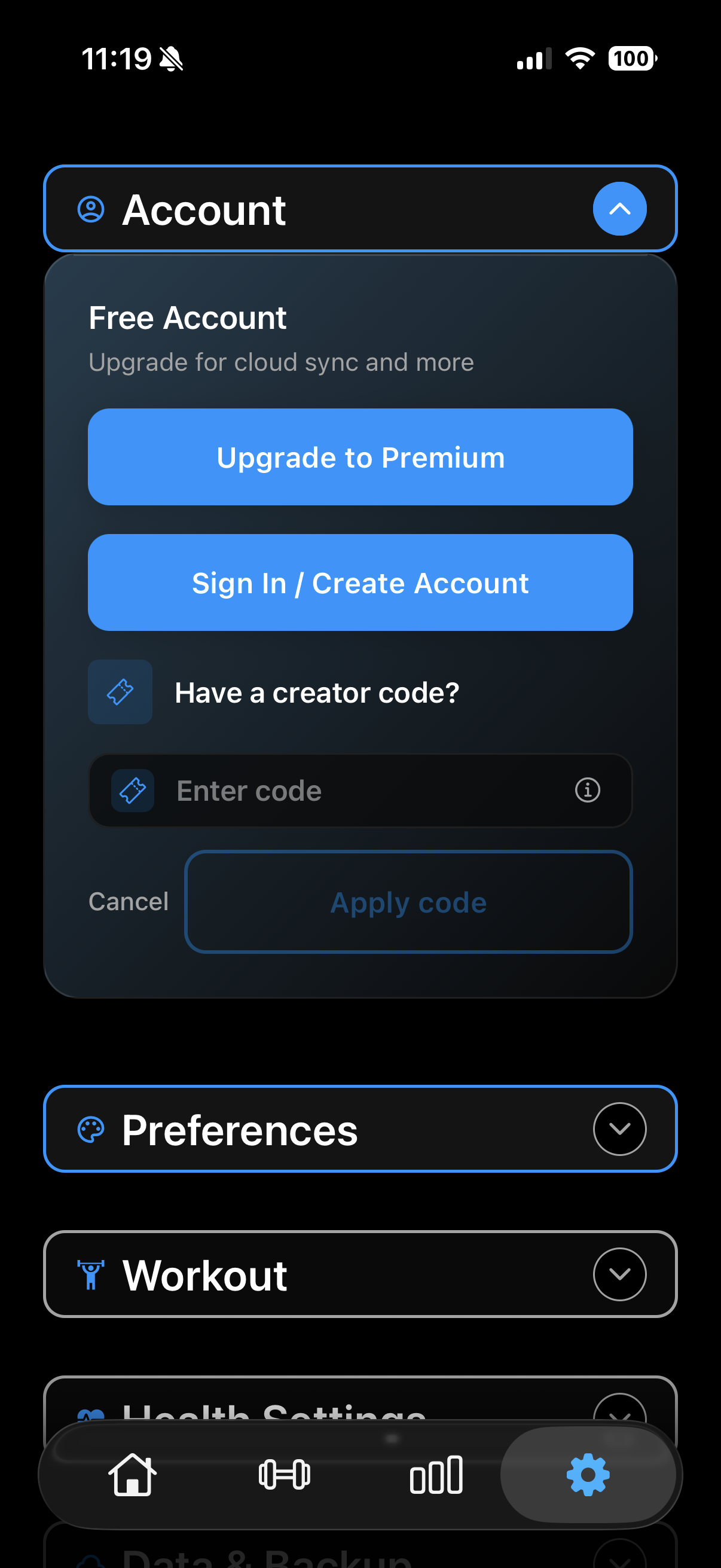
- Open Settings using the gear icon in the bottom navigation.
- Expand Account, then tap "Have a creator code?".
- Enter your code (it starts with "VL") and tap "Apply code". Your premium time starts immediately.
You can redeem a creator code directly from Settings — it does not need to be entered during onboarding.
What you get with premium
VolumeLogic is genuinely useful for free — logging, unlimited templates, volume tracking, and adaptive progression all work without Pro. Your creator code unlocks the Pro layer on top:
- Full exercise library: the built-in library with form cues and muscle targeting for every movement. (The free tier already lets you create unlimited custom exercises.)
- Advanced analytics: deeper volume trends, longer exercise history, and strength progression over time. See the training volume tracker page for details.
- Deeper coaching: per-muscle coaching volume and recovery-readiness guidance that helps you decide what to train and when. Covered in depth on the hypertrophy tracker page.
The free core app has no time limit. Your creator code adds the full exercise library, advanced analytics, and deeper coaching on top — free for the length of your code.
Common questions
Do I need a code to use VolumeLogic?
No. The app is free to download and the core workout tracker has no time limit. A creator code simply adds free premium time — you do not need one to get started.
Where do I get a creator code?
Codes are shared by VolumeLogic creators and partners on Instagram and TikTok. If someone sent you here, you likely already have yours.
What happens after my creator-code premium time ends?
You keep the free core app with no time limit. If you want to continue with premium features, you can start a subscription at that point — no obligation.
When exactly do I enter the code?
Open Settings using the gear icon, expand Account, tap "Have a creator code?", and enter it there.
Download VolumeLogic
Free on iOS and Android. Redeem your creator code from Settings to claim your free premium time.